

Rethinking Disaster Recovery for MPP Databases - Part 2
As illustrated in my previous article, managing MPP Postgres logical backups can be a chore. Does not matter if it is Broadcom Greenplum, EnterpriseDB Warehouse PG, or Apache Cloudberry – all suffer from the same effects:
- elongated backup times,
- table locks,
- slower queries
- equally long restore times, and
- backup management headaches.
A long-time banking customer had been suffering from all of the above. I pitched Broadcom's recently released Greenplum Disaster Recovery (GPDR) in 2023. By early 2024, pressure from the organization was applied to get it under control. Two day backups and a follow-on two day restore were not meeting their standards. This is an account of our journey reducing RPO as well as RTO from 2 days to under 15 minutes each with zero impact to application architecture.
When backups and restores drift into multi-day territory, the problem is rarely “backup tooling.” It’s usually architecture, retention physics, and WAL reality.
Discovery
Sun Tzu is often quoted as saying "First seek to understand". Paraphrase at best but applicable all the same. In those few words, we can expand into the following initial questions:
- What are we getting into?
- What are we dealing with?
- Can we afford to meet organization requirements?
Answering "how" will wait.
What are we getting into? / Mole hill or mountain?
The organization had been using Greenplum for years. During that time, many applications adopted it as their data warehouse. Due to Greenplum's success, the data warehouse management team had gotten a pass regarding backups. That pass had expired.
Each application used its own schema. To minimize the impact of backups causing locks, logical backups were done in groups of applications / schemas. For years, existing group backup had worked but with greater adoption and growth it was taking two days to complete all job groups.
Offsite was a disaster recovery cluster. Every backup was replicated and restored however logical backups took an equal amount of time to restore: two days.
What were our RPO and RTO goals? Brief definition on each since they are sometimes confused. RPO, or Restore Point Objective, is the maximum acceptable amount of data loss typically measured in time. Their existing process "delivered" two days, that is two days of data loss. RTO, or Restore Time Objective, is the maximum time the system could be tolerated being down for recovery without a major impact to business.
The answer I got: Two hour RPO and two hour RTO. On top of that, minimum one week retention of all backups.
Sure. No problem. Right?
RPO and RTO targets force you to measure time end-to-end (backup → replicate → restore → catch up), not just whether a job “finished.”
What are we dealing with? / Taking inventory
By the numbers, their production cluster was home to many applications with:
- 400 TB of storage,
- on 96 primary segments with two RAID-5 volumes, and
- across 16 segment hosts.
Not small but not terrible either.
Existing backup infrastructure included:
- cluster hosts with active-active private network interfaces,
- 10 Gbps private network, and
- DataDomain with four 25 Gbps capable network interfaces and 150 TB of storage.
My takeaway from this:
- Applaud for them using active-active. Trust all gear will fail eventually from NIC to switch port and everything in between.
- A private 10 Gbps network is a good start and may suffice however is something to be watched.
Regarding their DataDomain, I knew it was a capable NAS solution including data deduplication, compression, and replication. That coupled with DDBoost could make it very usable. DDBoost is an add on from DataDomain optimizing and at times negating the need for data transfers. Think along the lines of "server wants to send block X, DataDomain says it already has it, server moves on to next block." Neat, right?
If you’re relying on dedupe/compression appliances, you must validate behavior separately for base backups vs WAL.
Can we afford to meet organization requirements? / What's the budget?
Fortunately, I knew this organization was about preparation and doing the right thing. Of course justification was necessary. In advance of project kickoff I learned their antiquated offsite disaster recovery cluster was being replaced with new gear complete with NVMe storage. Big win!
DataDomain was already replicating to the same site as well and had equal storage and specs.
Known was this system's struggle with clean up's. Clean up for DataDomain as well as any other gear performing deduplication is the final removal of unnecessary blocks.
Deduplication and clean up's by way of a simple example:
- A 1 GB file may be broken up into 32 KB blocks therefore represented by 31,250 blocks
- If the identical file is stored, 1 GB of storage is used.
What if 1 block changes? 31,249 blocks are reused and two copies of the now slightly differing files consumes 1 GB + 32 KB storage. Deduplication demands tracking of these blocks and order of each for every file referencing each. This is one way solutions like DataDomain's can retain multiple backups representing hundreds of TB's on as little as 100 TB of actual storage.
Clean up's are necessary to release unreferenced blocks and the storage they consume. Some solutions do it continuously and others only periodically. This customer had their DataDomain on a once/week schedule. While clean up's were running, the storage was slow to the point of almost unresponsive. From experience, the 7-day backup retention had to be pushed to 8-days allowing for backups to complete before old were removed. This includes WAL files. This was a concern.
A second concern was the amount of storage itself. If we assume 400 TB will compress to 100 TB then 66% of actual storage will be used. We haven't gotten to WAL files.
WAL files produced is a good measure of overall database activity. Knowing how many would be critical, a simple WAL tracking system was implemented at the beginning of the project. After one month, we had real statistics.
- 5,408 average WAL's per hour
- 129,788 average WAL's per day
Postgres MPP software uses 64 MB per WAL file. An average day of uncompressed WAL files then is roughly 8.3 TB. We have 4:1 compression and deduplication though… no we don't
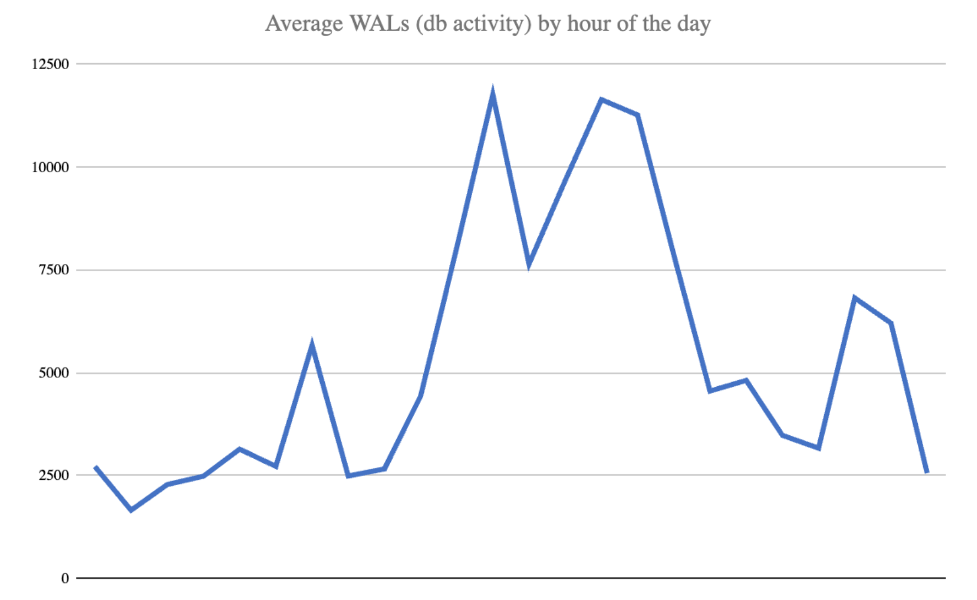
Through experimentation of compression, we discovered WAL files on average compression to barely 3:1 during times of high activity. Couple poor compression with near zero deduplication and we may be testing the limits of their DataDomain.
Other problems arose as well. Maximum hourly and daily WAL counts were also seen as frequently as every couple weeks to at least once a month. The highest observed:
- 189,156 WAL's in a single hour and
- 1,231,197 WAL's in a single day.
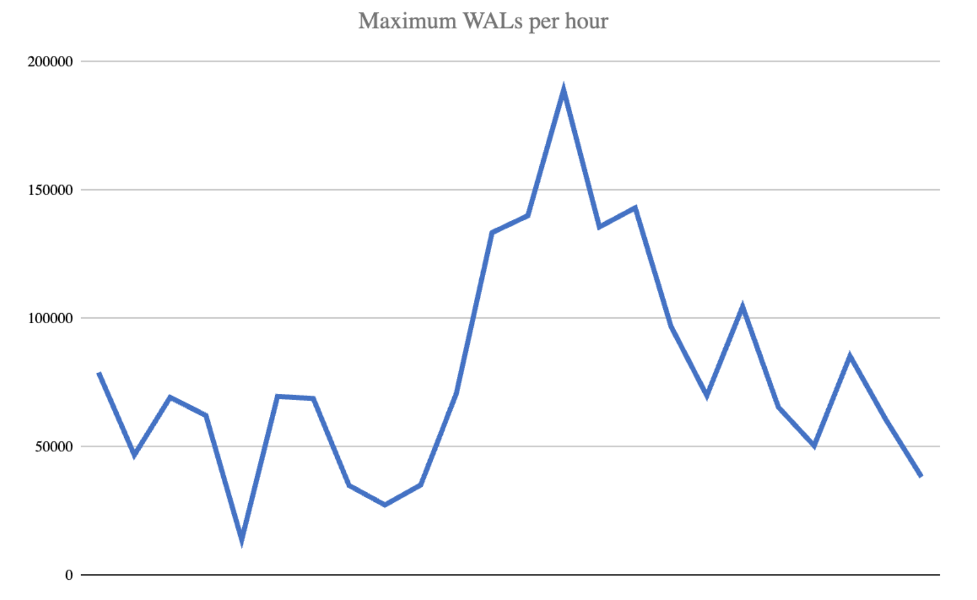
Should there be a whole week with heightened activity, we had to plan for 8.6 MM WAL files that wouldn't deduplicate and average 3:1 compression: 210 TB.
What was the likelihood of a full week of incredibly high activity? Slim but we had to be prepared. An 8-day window containing one WAL spike could produce close to 140 TB of uncompressed WAL's. Assuming 3:1 compression, over 45 TB would be necessary.
I was reminded of the 5 P's: Proper Planning Prevents Poor Performance. More storage was necessary. How much?
- 150 TB in existing DataDomain
- 100 TB for a single compressed backup (assumption)
- 20 TB of changed data for second compressed & deduplicated backup (also an assumption)
- 45 TB of compressed-only WAL files allowing for a single spike
15 TB isn't bad however the customer wanted more of a buffer and I didn't blame him. 100 TB addition to both primary and disaster recovery was necessary.
Moving forward
Waiting game for more storage to arrive. Time spent was in testing implementation using a development cluster and the new offsite disaster recovery cluster.
Tests included everything from
- time spent in backup,
- impact of backups on queries,
- replicating from primary to offsite DataDomain,
- impact of replication on live backups,
- time spent in initial restore,
- time spent applying WAL files to catch up,
- activating DR cluster and returning to recovery mode, and
- a whole lot in between.
To be continued…
Looking to Modernize Your MPP Disaster Recovery?
Whether you're running Greenplum, WarehousePG, or Cloudberry, implementing a reliable PITR + logical backup strategy requires careful planning. Our guest author and Mugnano Data Consulting can assist with:
- GPDR deployment and validation
- WAL-G PITR design for WarehousePG / Cloudberry
- Storage and WAL throughput sizing
- Backup automation and DR runbook creation
📩 Contact the guest author
🔧 Request a consulting engagement with MDC
