Putting It All Together: ClearVesta – The Property Management Data Pipeline Demo
Modern property-management platforms (Entrata, Yardi, AppFolio, etc.) expose rich data (leases, units, financials, property details, etc.) but each one structures its APIs differently. For real estate investment firms, the hard part isn’t getting data out, it’s standardizing those inconsistent REST, JSON, and CSV feeds into a clean, governed dimensional model that can power KPIs, period-over-period reporting, and compliance analytics.
To show how we would solve this, Mugnano Data Consulting built a Property Management Demo Pipeline: a fully automated, metadata-driven system showing how we onboard any property-management API into a high-quality Type-2 dimensional warehouse with minimal custom coding.
Reusing Proven Design Patterns
This demo is not a one-off. It reuses the same automation framework described in our earlier posts, for example DBSchema Dimensional Model Automation . The same design patterns that auto-generate dimensional structures in that blog are extended here to handle REST APIs and JSON.
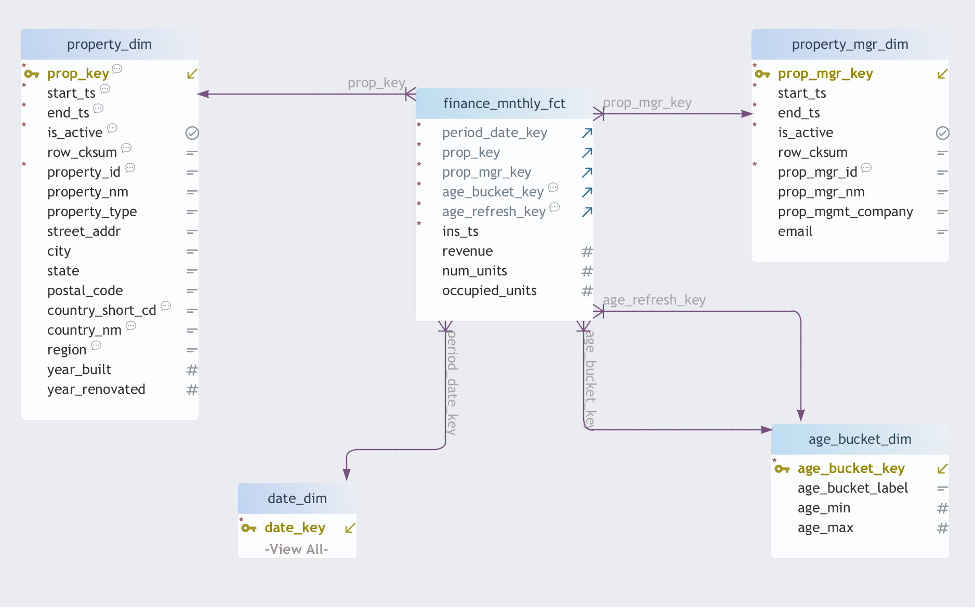
The end result is a fully functioning star schema:
- finance_mnthly_fct : monthly KPIs per property
- property_dim : Type-2 historical property attributes
- property_mgr_dim : Type-2 history of manager assignments
- age_bucket_dim : property age buckets
- date_dim : standard date dimension
All of this is driven by metadata and reusable automation components rather than custom, one-off ETL.
Architecture Overview: From REST APIs to Star Schema
At a high level, the demo walks JSON data through the following stages:
- REST API calls to a server simulating Entrata
- Landing raw JSON into operational data store (ODS) tables
- Metadata-driven JSON flattening into staging tables
- Automated Type-2 dimension processing
- Population of a finance fact table for reporting

Key Idea
The logic for how to call APIs and how to flatten JSON is stored in metadata tables, not in code. When the source changes, we update configuration rows, not pipelines.
Metadata-Driven REST API Configuration
The demo uses a REST server that simulates Entrata. Each table in the warehouse is tied to a REST endpoint through two core metadata tables.
1. meta.json_restapi_conf : where the JSON comes from
This table defines which REST endpoint provides the data for each target table:
- table_name — the target table to load
- rest_url — REST API URL for the source
- navigation_path — JSON path to the repeating array
When the pipeline loads a table, it reads this metadata to determine which endpoint to call and how to navigate the nested JSON.
2. meta.json_flatmap : how JSON maps to columns
Instead of hand-coding JSON parsing per endpoint, we use a generic path-based mapper:
- table_name — target table being loaded
- path — array of keys representing the JSON path
- target_name — output column name
- target_type — data type to cast to
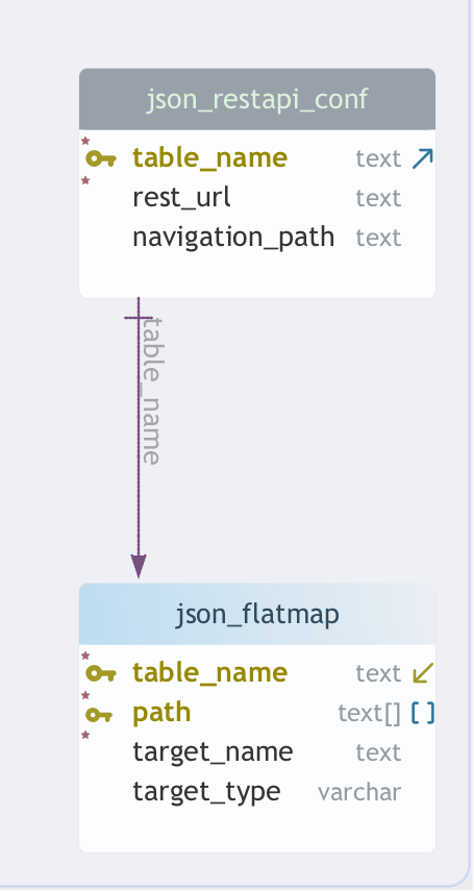
Adding a new JSON attribute, or even a new vendor, becomes a configuration change:
- Insert a row in meta.json_restapi_conf to point at the new endpoint
- Insert rows in meta.json_flatmap for each JSON path you want to map
No new ETL pipelines. No schema-specific code. No brittle JSON handling.
Design Pattern Reuse
This metadata-first mindset is the same design pattern we use in our generalized dimensional-model automation. In the DBSchema Dimensional Model Automation blog, we show how we can generate tables and views from a schema design. Here, we extend that idea to JSON: the schema is stored in metadata, and the loader simply follows the rules.
Automatic “Unmapped JSON” Views
During onboarding, one of the hardest questions is: What JSON fields are we missing? To answer that, the demo auto-generates a series of “unmapped” views directly from the JSON.
For every ODS table sourced from JSON, we generate views such as:
- ods_entrata.v_properties_json_unmapped
- ods_entrata.v_managers_json_unmapped
- ods_entrata.v_units_json_unmapped
These views show precisely which JSON fields arrive from the source but are not yet configured in meta.json_flatmap.
Practical Workflow
Onboard a new API? Start by loading the raw JSON into ODS, then query the unmapped view. Every field you see there is either new or not yet mapped. Add rows to meta.json_flatmap, reload, and the view will shrink as coverage increases.
This is the exact same workflow outlined in our internal ClearVesta README:
- Load the ODS table with JSON from the source.
- Query the *_json_unmapped view to see unmapped paths.
- Add mappings into meta.json_flatmap.
- Rerun the dimension/staging loader.
Analysts and data engineers get a guided, iterative mapping process instead of manual JSON deep-diving.
Automated Type-2 Dimensions (SCD-2)
Every main business entity—property, manager, age bucket—uses Mugnano Data Consulting’s standard SCD-2 engine, first introduced in our dimensional-model automation work.
The engine:
- Detects attribute changes via row checksums
- Expires the previous version with end_ts and is_active = false
- Inserts a new current version with updated attributes
- Maintains clean surrogate keys (e.g., prop_mgr_key)
For example, the star.sp_populate_property_mgr_dim procedure:
- Loads flattened manager data into stg_star.property_mgr_stg
- Calls a generic process_dimension function
- Handles all SCD-2 bookkeeping for star.property_mgr_dim
One Pattern, Many Dimensions
Because the pattern is generic, we can onboard new entities (properties, managers, units, tenants) simply by defining staging and letting process_dimension handle the history logic. The same code path powers every Type-2 dimension in the demo.
The Finance Fact Table: Monthly Performance in Context
The finance_mnthly_fct table ties everything together:
- period_date_key — month being analyzed
- prop_key — property surrogate key (Type-2)
- prop_mgr_key — manager surrogate key (Type-2)
- age_bucket_key — property age band
- revenue — monthly revenue
- num_units — total units
- occupied_units — occupied units
- ins_ts — load timestamp
Because the dimensions are Type-2, each monthly snapshot links to the correct historical version of:
- Property attributes (location, year built, renovations, etc.)
- Assigned property manager
- Age bucket and regional attributes
This enables real business analysis, such as:
- How did revenue shift after a new manager took over a property?
- How do newly built properties behave over time compared to older stock?
- Which regions show sustained occupancy growth or decline?
Built for Entrata Today, Yardi or AppFolio Tomorrow
The goal of this demo is not to support a single vendor—it is to support any property-management platform with minimal engineering effort. Because everything is metadata-driven, system differences are absorbed by configuration:
- REST vs. SOAP vs. CSV/SFTP
- Different JSON structures
- Different naming conventions and hierarchies
To add another vendor, we:
- Point meta.json_restapi_conf at the new endpoints
- Define JSON paths in meta.json_flatmap
- Use the *_json_unmapped views to catch anything we missed
Vendor-Neutral by Design
Whether the JSON comes from Entrata today or AppFolio and Yardi tomorrow, the warehouse model, Type-2 logic, and reporting layer remain stable. Only the metadata changes.
This Demo Is the Ingestion Backbone for ClearVesta
This property-management demo forms the ingestion backbone for the ClearVesta analytics platform:
- Onboard any vendor via REST, SOAP, or CSV
- Map JSON fields automatically using metadata
- Build SCD-2 dimensions using a standard engine
- Generate a consistent, governed star schema
- Deliver accurate, historical reporting for owners and operators
In short: it brings enterprise-grade ETL automation to the property-management domain, built on repeatable design patterns already proven in other Mugnano Data Consulting projects.
Related MDC Blog Posts
- Data Modeling Tool for Greenplum - DBSchema Data Modeling tool
- DbSchema Dimensional Model - Type-2 dimension handling extended for metadata-driven JSON flattening
- Automating Agile Data Onboarding with Greenplum Sailfish - CSV loads into ClearVesta.
- Turn “Ad-Hoc Chaos” into Trusted Self-Service BI - Enabling Self-Service BI on ClearVesta.
- DBA Hub - Database management.
Tools & Technologies Used
- WarehousePG - Database chosen for demo
- PL/pgSQL - ODS->Staging transformation logic and Type-2 automation
- Python - REST ingestion
- Reporting Tool - Client choice
- Scheduler - Client choice
- Infrastructure - Client choice
- OS - Modern Linux versions. Demo uses Rocky Linux 9.6 (Blue Onyx)